 By Saksham Arora
 The Singareni Collieries Company Limited, commonly known as SCCL, operates one of India’s largest coal mining networks. The company manages thousands of employees working across mines, offices, and operational departments.
To improve workforce management and reduce administrative delays, SCCL provides a dedicated digital ecosystem for employees through its Employee Portal and ESS (Employee Self-Service) system.
The SCCL employee login platform allows staff members to access payroll records, service details, medical information, accommodation services, and internal communication tools online.
What is SCCL Employee Login Portal?
The SCCL Employee Portal is an online self-service platform developed for company employees, ex-employees, and internal departments.
Through this system, employees can:
- Download payslips
- Access salary reports
- Check service records
- Use accommodation booking services
- View medical information
- Submit internal requests
The platform helps simplify HR and administrative processes digitally.
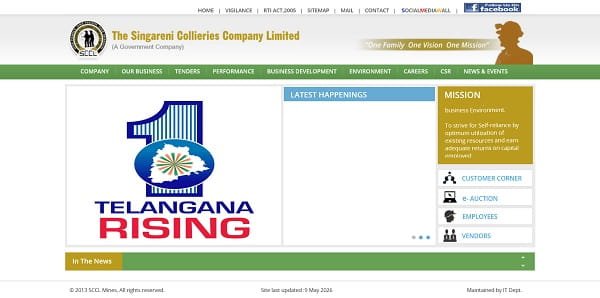
Official SCCL Employee Portal
Employees can access the official SCCL website through: https://www.scclmines.com
Some internal applications are also hosted separately through:
SCCL Internal Applications
Main SCCL Employee Services
SCCL provides multiple employee-focused systems through its online platform.
SCCL ESS Portal
The Employee Self-Service (ESS) portal is the main employee management system.
It allows staff members to:
- Manage personal records
- Access salary information
- Submit requests
- Monitor service details
Accommodation Booking System
Employees can use the portal to book company accommodation and transit facilities.
Internal Application Access
Certain reporting and operational tools are accessible through SCCL internal systems.
How to Login to SCCL Employee Portal
Employees can access the ESS system using official credentials.
Step 1: Visit the Official Website
Open your browser and visit: https://scclmines.com/scclnew/index.asp
Step 2: Open Employee or ESS Section
Navigate to the Employee Services or SCCL ESS Portal section.
Step 3: Enter User ID
Type your Employee Code or Personal Number provided by SCCL.
Step 4: Enter Password
Now enter your secure password carefully.
First-time users may need temporary credentials from the IT department.
Step 5: Login to Dashboard
After successful verification, the employee dashboard will open.
Main Features of SCCL ESS Portal
The SCCL ESS portal offers many useful services for employees.
Salary and Payroll Services
Employees can access important financial information online.
Monthly Payslip Download
The portal allows employees to download detailed salary slips containing:
- Basic Pay
- DA
- HRA
- Salary Deductions
- Net Salary
Annual Salary Statements
Employees can also access yearly earning and deduction summaries.
Form-16 and Tax Information
The portal provides tax-related documents for income tax filing.
Medical and Health Services
SCCL employees can access health-related information through the portal.
Empanelled Hospital Information
Employees can view approved hospitals where company medical benefits are available.
Medical Board Results
The portal also displays updates related to medical examinations and board reports.
Safety and Communication Tools
Safety is extremely important in mining operations, and SCCL provides digital reporting tools for employees.
Safety Suggestions
Employees can submit safety-related recommendations and workplace improvement ideas.
Internal Notifications
The system also shares:
- Circulars
- Department updates
- Safety notices
- Administrative announcements
Forgot Password Process
Employees who forget their password can reset it online.
Steps to Recover Password
- Click on “Forgot Password.”
- Enter Employee ID or Personal Number.
- Verify OTP through registered mobile number.
- Create a new password.
If recovery fails, employees should contact their unit IT department.
Common Login Problems and Solutions
Incorrect Credentials
Check Employee ID and password carefully before login.
Browser Compatibility Issues
Use updated versions of:
- Google Chrome
- Microsoft Edge
for smoother access.
Internal Network Restrictions
Some SCCL applications only work within the company intranet or secure VPN connection.
Slow Portal Loading
Clear browser cache and cookies if pages fail to load properly.
Security Tips for Employees
Use Official Website Only
Always verify that the website belongs to the official scclmines.com domain.
Avoid Sharing Passwords
Keep login credentials private and secure.
Logout Properly
Always logout after using the portal, especially on shared systems.
Avoid Public Networks
Do not access employee systems using insecure public Wi-Fi.
Benefits of SCCL Employee Portal
Faster Employee Services
Most administrative work can now be completed online.
Reduced Paperwork
Digital systems reduce dependency on physical files and forms.
Better Transparency
Employees can independently check salary and service records.
Improved Communication
The platform helps employees stay informed about company updates and policies.
Important Information for Employees
| Feature | Details |
| Organization | SCCL |
| Main Website | scclmines.com |
| Employee Portal | SCCL ESS Portal |
| Internal Access | webhyd.scclmines.com |
| Login ID | Employee Code / Personal Number |
| Main Services | Payroll, ESS, Medical, Accommodation |
Final Words
The SCCL Employee Login portal has become an important digital platform for employees working under The Singareni Collieries Company Limited. From salary management to medical services and internal communication, the ESS system simplifies many daily administrative tasks.
As mining and industrial organizations continue modernizing operations, digital systems like SCCL ESS are helping improve efficiency, transparency, and employee convenience across departments.