 By Saksham Arora
 The EPFO Passbook is an online digital statement that shows complete details of an employee’s Provident Fund (PF) account. It includes information about employee and employer contributions, interest credited by the EPFO, withdrawals, and the total PF balance.
Employees registered under the EPF scheme can access their passbook online through the official EPFO portal: https://passbook.epfindia.gov.in/MemberPassBook/login
This facility allows EPF members to monitor their retirement savings anytime without visiting an EPFO office.
What is EPFO Passbook?
The EPFO passbook works like a bank statement for your PF account. It displays the monthly deposits made by both the employee and employer, along with interest and pension contributions.
Through the EPFO passbook portal, members can view and download their transaction records, helping them track whether employers are depositing PF contributions correctly.
The passbook contains important information such as:
- Employee monthly PF contribution
- Employer contribution to EPF and EPS
- Interest credited to the PF account
- Withdrawal or transfer records
- Total PF balance and account details
Regularly checking the passbook helps employees stay informed about their retirement savings.
EPFO Passbook Login Process
Employees can check their PF passbook online using their Universal Account Number (UAN). Follow these steps to access the passbook.
Step 1: Visit the Official Portal
Go to the EPFO passbook login page: https://passbook.epfindia.gov.in/MemberPassBook/login
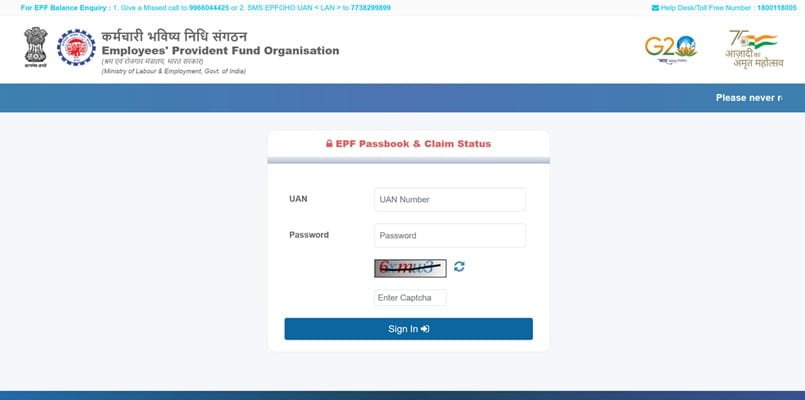
Step 2: Enter Login Credentials
Provide the following details:
- UAN (Universal Account Number)
- Password
- Captcha code
Step 3: Select Member ID
After login, choose your Member ID if multiple PF accounts are linked to your UAN.
Step 4: View or Download Passbook
The passbook will display all transaction details, and you can download it in PDF format for records.
Information Available in EPFO Passbook
The EPF passbook provides detailed financial records of your provident fund account.
- Employee Contribution
Every month, employees contribute 12% of their basic salary and dearness allowance to the EPF account.
- Employer Contribution
Employers also contribute 12% of the employee’s salary, part of which goes to the EPF account and part to the pension scheme (EPS).
- Interest Credited
EPFO credits annual interest to the PF balance, which increases retirement savings over time.
- Pension Contribution
A portion of the employer contribution goes to the Employees’ Pension Scheme (EPS).
- Withdrawal and Transfer Records
If you withdraw PF or transfer the balance when changing jobs, the transaction will appear in the passbook.
Benefits of Using the EPFO Passbook
The EPFO passbook offers several advantages to members.
✔ Transparency
Members can verify whether employers are depositing PF contributions regularly.
✔ Easy Financial Tracking
Employees can track their retirement savings growth and interest earned.
✔ Online Access
The passbook can be accessed anytime from anywhere without visiting EPFO offices.
✔ Downloadable Records
Members can download the passbook as a PDF for documentation or financial planning.
✔ Helpful for PF Claims
The passbook is often required when submitting withdrawal or transfer claims.
Latest Update: Passbook Lite Feature
EPFO recently introduced a “Passbook Lite” feature within the member portal. This allows users to quickly view PF contributions, withdrawals, and balances without accessing the separate passbook portal.
The feature is designed to provide faster access to PF information with a simpler interface and lower data usage.
Alternative Ways to Check EPF Balance
If the passbook portal is temporarily unavailable, EPFO members can also check their PF balance using other methods:
Missed Call Service
Give a missed call from your registered mobile number to 9966044425 to receive PF balance details.
SMS Service
Send an SMS in the format: EPFOHO UAN ENG to 7738299899
UMANG Mobile App
The government’s UMANG app also allows members to view their EPF passbook and account details.
These options ensure that members can access their PF information even if the website is experiencing technical issues.
FAQs – EPFO Passbook
Q1. What is EPFO Passbook?
EPFO passbook is a digital record of an employee’s provident fund account that shows monthly contributions, interest earned, withdrawals, and total PF balance.
Q2. How can I download my EPF passbook?
Visit the official passbook portal, log in using your UAN and password, select your Member ID, and download the passbook as a PDF.
Q3. Can I check my PF balance without logging into the portal?
Yes. You can check your PF balance through SMS, missed call service, or the UMANG mobile application.
Q4. Why is my EPFO passbook not showing?
The passbook may not appear if:
- Your UAN is not activated
- KYC details are not verified
- Your employer has not filed the latest contribution returns
Q5. How often is the EPF passbook updated?
The passbook is generally updated after the employer submits the monthly contribution details through the EPFO system.
Q6. Is the EPFO passbook available for all members?
Yes, but members must have an activated UAN and approved KYC details to access the passbook.
Q7. Can I access my EPF passbook on mobile?
Yes. You can check your passbook through the UMANG mobile app or by logging in to the EPFO passbook portal using your smartphone.