 By Saksham Arora
 The EPFO Employer Login portal is an online system developed by the Employees’ Provident Fund Organisation (EPFO) to help employers manage Provident Fund (PF) contributions and compliance digitally. Through the Unified Employer Portal, registered establishments can upload employee contribution details, generate challans, update employee records, and ensure that all statutory PF requirements are fulfilled.
Employers can access the portal through the official login page: https://unifiedportal-emp.epfindia.gov.in/epfo/
This online platform helps organisations handle EPF-related administrative tasks quickly and securely without visiting EPFO offices.
What is EPFO Employer Login?
EPFO Employer Login is a secure login interface designed for companies and establishments registered under the EPF scheme. It allows authorised representatives such as HR managers, payroll staff, or company administrators to manage employee provident fund accounts online.
Through this portal, employers can submit monthly contribution reports, monitor compliance status, and maintain employee PF records digitally. The portal ensures transparency in PF management and simplifies statutory reporting for organisations across India.
Who Can Use the EPFO Employer Portal?
The employer portal is mainly used by:
- Registered establishments under the EPF Act
- HR and payroll departments
- Company administrators
- Chartered accountants handling PF compliance
- Contractors or principal employers managing PF obligations
Any organisation covered under the EPF scheme must regularly upload employee contribution details and make PF payments through the EPFO employer portal.
How to Login to EPFO Employer Portal
Employers can access the unified portal by following these steps:
Step 1: Visit the Employer Login Page
Open the official portal: https://unifiedportal-emp.epfindia.gov.in/epfo/
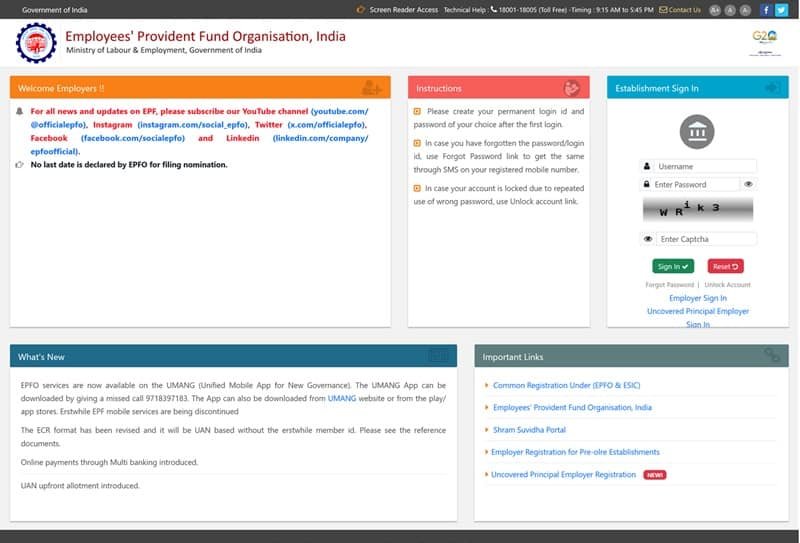
Step 2: Enter Login Credentials
Provide the required details:
- Establishment Username
- Password
- Captcha code
Step 3: Click “Sign In”
After successful authentication, the employer dashboard will open.
Once logged in, employers can access several EPFO services such as filing Electronic Challan-cum-Return (ECR) and managing employee information.
Services Available After EPFO Employer Login
The unified employer portal provides multiple services that help businesses maintain PF compliance.
- Electronic Challan-cum-Return (ECR) Upload
Employers can upload monthly PF contribution details of employees using the ECR system.
- Online Challan Generation
The portal allows companies to generate challans and make PF payments online.
- Employee Record Management
Employers can add new employees, update records, and generate Universal Account Numbers (UAN).
- KYC Approval
Employee KYC details such as Aadhaar, PAN, and bank account must be verified by the employer through the portal.
- Contribution History
Employers can view payment history, download receipts, and track contribution records.
These services make PF management faster and more efficient for organisations.
EPFO Employer Login vs Member Login
The EPFO system provides separate portals for employees and employers.
| Feature | Employer Portal | Member Portal |
| Users | Companies / HR departments | Individual employees |
| PF Contributions | Submit monthly PF payments | Not available |
| ECR Filing | Yes | No |
| Claim Filing | Approve employee claims | Submit claim |
| Passbook Access | Not available | Available |
This separation ensures secure access and role-based permissions for users.
Important Login Credentials Required
Before accessing the portal, employers should keep the following information ready:
- Establishment ID
- Employer username
- Password
- Captcha verification
These credentials are provided when the establishment registers under EPFO.
Benefits of EPFO Employer Portal
The employer portal provides several advantages for organisations.
✔ Digital Compliance Management
Companies can complete PF filings and payments online without paperwork.
✔ Faster Contribution Processing
Online challan generation and ECR upload make monthly PF submissions faster.
✔ Accurate Employee Records
Employers can update employee information and verify KYC details easily.
✔ Transparency
Both employees and employers can track contributions through the EPFO system.
✔ Time-Saving
Online services reduce the need to visit EPFO offices.
Overall, the unified portal has modernised the way companies manage provident fund responsibilities.
Security Tips for Employers
Since the employer portal contains sensitive financial and employee data, organisations should follow security practices:
- Use a strong password
- Do not share login credentials
- Log out after completing work
- Keep Digital Signature Certificate (DSC) secure
- Access the portal only from trusted devices
These steps help protect the establishment account from cyber fraud.
Conclusion
The EPFO Employer Login portal plays a crucial role in managing provident fund contributions for employees in India. By offering online services such as ECR filing, challan generation, and employee record management, the portal helps companies maintain compliance with EPF regulations efficiently.
With digital tools and secure login systems, the unified employer portal has made PF administration easier, faster, and more transparent for organisations across the country.
FAQs – EPFO Employer Login
Q1. What is EPFO Employer Login?
EPFO Employer Login is a portal that allows registered companies to manage employee provident fund contributions and compliance online.
Q2. Where can employers log in to the EPFO portal?
Employers can log in through the official unified employer portal at: https://unifiedportal-emp.epfindia.gov.in/epfo/
Q3. What is ECR in EPFO?
ECR stands for Electronic Challan-cum-Return, which employers use to submit monthly PF contribution details for employees.
Q4. Can employers generate UAN through the portal?
Yes. Employers can register employees and generate Universal Account Numbers (UAN) through the EPFO employer portal.
Q5. What should I do if I forget my employer login password?
Use the “Forgot Password” option on the login page. You can reset the password using OTP verification on the registered mobile number.
Q6. Can employers update employee KYC details?
Employers cannot update KYC themselves but must verify and approve KYC requests submitted by employees.
Q7. Is EPFO Employer Portal mandatory for companies?
Yes. Establishments covered under the EPF Act must use the employer portal to submit contributions and maintain PF compliance.