 By Saksham Arora
 The Finance Department of the Government of Assam has introduced the FinAssam Portal to modernize employee and financial management across the state. This online platform helps government employees access salary details, service records, pension information, and other HR-related services without depending completely on manual office work.
One of the most important parts of this system is the Employee Self Service (ESS) module. Through the ESS portal, employees can manage their personal and financial records directly from a computer or mobile phone.
The FinAssam employee login system has simplified administrative work and improved transparency for thousands of Assam government employees.
What is FinAssam Portal?
FinAssam is an integrated financial management system developed by the Assam Finance Department. The portal was created to digitize government finance operations and employee services.
The Employee Self Service (ESS) section allows employees to independently access important information related to salary, pension, leave, and service records.
The official website of the portal is: https://fin.assam.gov.in
The system is mainly used by Assam government departments, employees, Drawing and Disbursing Officers (DDOs), and finance administrators.
Main Features of FinAssam ESS Portal
The ESS module provides many useful online services for employees.
Salary Payslip Download
Employees can download monthly salary slips directly from the portal. The payslip contains details such as:
- Basic Pay
- Dearness Allowance (DA)
- House Rent Allowance (HRA)
- Deductions
- Net Salary
- GPF Contribution
This removes the need for manual salary slip collection from offices.
Personal Information Management
Employees can update certain personal details including:
- PAN information
- Spouse name
- Date of joining
- Contact information
However, final approval is done by the concerned DDO.
GPF and Pension Information
The portal allows employees to track General Provident Fund (GPF) contributions and pension-related records.
Leave Information
Users can check leave balances and monitor leave approvals through the system.
Online Data Correction
If service details or salary information contain errors, employees can submit correction requests online.
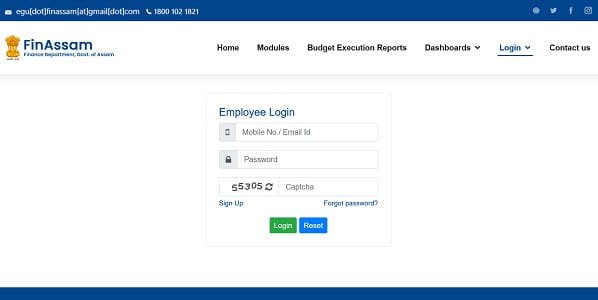
How to Login to FinAssam Employee Portal
The login process is simple and user-friendly.
Step 1: Visit the Official Website
Open your browser and go to: https://fin.assam.gov.in
Step 2: Open Employee Login
On the homepage, find the “Login” section and choose “Employee Login” or ESS Login.
Step 3: Enter User ID
Your registered mobile number or email ID usually works as the login ID.
Step 4: Enter Password
Type your secure password carefully.
Step 5: Complete Captcha Verification
Enter the captcha code displayed on the screen.
Step 6: Click Login
After successful verification, you will reach your employee dashboard where all services are available.
Forgot Password Process
Employees who forget their password can reset it easily.
Follow these steps:
- Click on “Forgot Password?”
- Enter your registered mobile number or email ID.
- Verify OTP received on your phone.
- Create a new password.
Always use a strong password for better account security.
Common Login Problems and Solutions
Sometimes users may face technical issues while accessing the portal. Most problems can be fixed easily.
Incorrect Password
Check whether Caps Lock is turned on while entering the password.
Captcha Not Loading
Refresh the page or clear browser cache and cookies.
Slow Website Performance
Heavy traffic during salary release periods may temporarily slow down the portal.
Browser Compatibility Issues
For smoother performance, use updated versions of:
- Google Chrome
- Mozilla Firefox
Role of DDO in FinAssam Portal
The Drawing and Disbursing Officer (DDO) plays an important role in validating employee data.
Whenever employees request changes in service records or personal information, the DDO verifies and approves those updates before they become permanent.
This system improves accuracy and reduces fraudulent modifications.
FinAssam Mobile App
To make access easier, the Finance Department also offers the FinAssam mobile application for Android users.
The app allows employees to:
- View salary slips
- Access ESS services
- Check GPF details
- Monitor updates in real-time
The mobile interface is useful for employees working in remote locations or field offices.
Benefits of FinAssam Portal
The FinAssam system has improved administrative efficiency in Assam government departments.
Reduced Paperwork
Most employee services are now available online, reducing dependency on physical documents.
Faster Access to Information
Employees can instantly access salary and service records anytime.
Better Transparency
The system allows personnel to verify financial records directly, improving trust and accountability.
Time Saving
Employees no longer need repeated office visits for basic administrative work.
Important Information for Employees
| Feature | Details |
| Official Portal | FinAssam |
| Login ID | Mobile Number / Email |
| Main Service | Employee Self Service (ESS) |
| Salary Access | Online Payslip Download |
| Approval Authority | DDO |
| Mobile Support | Android App Available |
Final Words
The FinAssam Employee Login portal has become an important digital platform for Assam government employees. From downloading payslips to updating personal records and checking pension details, the ESS system makes administrative tasks much easier and faster.
As digital governance continues growing in India, platforms like FinAssam are helping government departments improve transparency, efficiency, and employee convenience across the state.