 By Saksham Arora
 Apna is one of India’s leading job and recruitment platforms, connecting job seekers, recruiters, and companies through its website and mobile app. The platform is widely used for finding jobs, hiring employees, managing applications, and professional networking.
Apna provides different login systems depending on the type of user. Job seekers use the Candidate Login portal, recruiters use the Employer Dashboard, while internal company employees access separate corporate systems.
Understanding the correct login option is important because each portal serves a different purpose.
What is Apna Login Portal?
The Apna platform offers online access for:
- Job seekers
- Recruiters and employers
- Internal Apna employees
Through these portals, users can apply for jobs, manage hiring, track applications, and access professional tools digitally.
Apna Candidate Login for Job Seekers
The Candidate Login portal is designed for individuals searching for jobs across different industries.
How to Login as a Job Seeker
Follow these steps:
- Visit the official Apna login page: https://employer.apna.co
- Enter your registered mobile number.
- Verify using OTP received on your phone.
- Complete your profile details.
- Start applying for jobs directly through the platform.
The candidate dashboard allows users to search for jobs based on:
- Location
- Salary
- Skills
- Experience
- Industry type
Main Features for Candidates
The Apna platform provides several useful tools for job seekers.
Job Search
Users can search for:
- Private jobs
- Work-from-home jobs
- Part-time jobs
- Fresher jobs
- Sales and delivery jobs
- IT and office jobs
Resume and Profile Management
Candidates can create and update professional profiles online.
Application Tracking
Users can monitor:
- Applied jobs
- Interview updates
- Recruiter responses
Skill-Based Recommendations
The platform suggests jobs based on user experience and profile information.
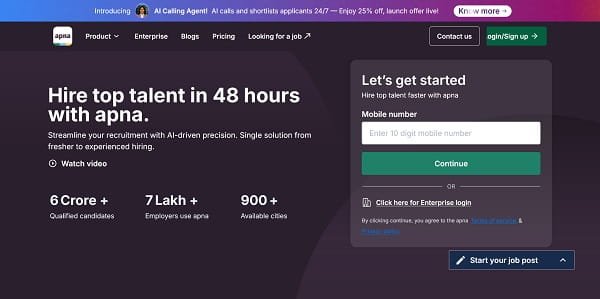
Apna Employer Login
The Employer Portal is designed for recruiters, HR teams, and business owners looking to hire employees.
Official Employer Portal: https://employer.apna.co
How to Login as an Employer
- Visit the employer portal.
- Enter registered mobile number or work email.
- Complete OTP or password verification.
- Access employer dashboard.
Recruiters can manage hiring activities directly from the portal.
Features of Employer Dashboard
Job Posting
Employers can post job vacancies across multiple categories.
Candidate Management
Recruiters can:
- View applications
- Shortlist candidates
- Contact applicants directly
Resume Access
Employers can download resumes and review candidate profiles.
AI Calling Tools
The platform also offers AI-powered calling and lead management features for recruiters.
Internal Employee Login for Apna Staff
Employees working directly for Apna use separate internal systems for office and HR management.
Most internal access is managed through:
- Google Workspace login
- Corporate Single Sign-On (SSO)
- Internal HRMS platforms
Depending on department setup, internal employees may use systems such as:
- Keka
- Darwinbox
- Zoho People
Internal access links are usually shared during onboarding.
Apna Mobile App
apna — Job Search App is available for Android and iPhone users.
The mobile app is the most popular way to access Apna services.
Features of Apna App
- Job search
- Quick applications
- OTP login
- Interview updates
- Notifications
- Employer communication
The app provides a mobile-friendly experience for both freshers and experienced professionals.
Common Login Problems and Solutions
OTP Not Received
Wait for a few minutes and use the “Resend OTP” option if necessary.
Browser Loading Issues
Clear browser cache and cookies before retrying login.
Incorrect Mobile Number
Ensure the registered number is entered correctly.
Slow App Performance
Update the app to the latest version from the Play Store or App Store.
WhatsApp and Notification Support
Apna also sends:
- Job alerts
- Login links
- Application updates
- Interview notifications
through WhatsApp and mobile notifications.
Benefits of Apna Platform
Easy Job Access
Candidates can apply for jobs quickly without complex processes.
Faster Hiring
Recruiters can connect with suitable candidates directly.
Mobile-Friendly System
The app allows users to manage everything from smartphones.
Wide Job Categories
The platform supports jobs across many industries and experience levels.
Support and Helpdesk
Users facing technical issues can contact support through:
support@apna.co
Important Information
| User Type | Portal |
| Job Seekers | apna.co/login |
| Employers | employer.apna.co |
| Internal Staff | Corporate SSO |
| Mobile Access | Apna Job Search App |
| Support | support@apna.co |
Final Words
The Apna Login portal has become an important digital platform for job seekers, recruiters, and employers across India. Whether someone is searching for a new job, hiring staff, or managing internal employee systems, Apna offers a simple and user-friendly online experience.
With mobile access, OTP-based login, and smart hiring tools, the platform continues helping millions of users connect with employment opportunities more efficiently.