 By Saksham Arora
 The Employees’ State Insurance Corporation, commonly known as ESIC, provides medical and financial support to millions of workers across India. Under the ESI scheme, employees receive benefits such as medical treatment, sickness compensation, maternity support, disability coverage, and dependent benefits.
To simplify access to these services, ESIC offers an online portal for insured employees called the Insured Person (IP) Portal. Through this system, workers can check contribution details, download their e-Pehchan card, manage family information, and track eligibility for benefits.
The portal has become an important digital service platform for employees working in factories, companies, and private establishments covered under the ESI Act.
What is the ESIC Employee Login Portal?
The ESIC Employee Login Portal, also called the Insured Person (IP) Portal, is an online self-service system for employees registered under the ESI scheme.
Unlike the employer portal, which is used by companies for contribution filing and employee registration, the IP Portal is specifically designed for workers and beneficiaries.
The official ESIC portal can be accessed through: https://www.esic.gov.in
The employer login page is available at: https://portal.esic.gov.in/EmployerPortal/ESICInsurancePortal/Portal_Loginnew.aspx
Main Features of ESIC Employee Portal
The portal provides several useful services for insured employees.
Download e-Pehchan Card
Employees can download their digital ESIC identity card online. The e-Pehchan card is required while visiting ESIC hospitals and dispensaries.
Check Employer Contributions
Workers can verify whether their employer is regularly depositing ESI contributions deducted from salary.
Medical Benefit Information
Employees can view eligibility details for medical treatment and cash benefits.
Family Details Management
Users can check and update dependent information including spouse, children, and parents.
Claim and Benefit Status
Employees can track the status of sickness claims, maternity claims, and other benefit payments.
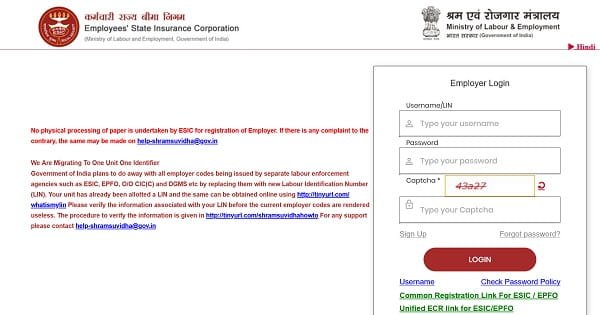
How to Login to ESIC Employee Portal
The login process for employees is simple.
Step 1: Visit the Official Website
Open your browser and go to: ESIC Official Portal
Step 2: Open Insured Person Login
Click on the “Insured Person/Beneficiary” option available on the homepage.
Step 3: Enter Insurance Number
Your 10-digit Insurance Number (IP Number) works as the User ID.
This number is available on:
- Pehchan Card
- Salary Slip
- ESIC Registration Documents
Step 4: Enter Password
Type your password carefully.
First-time users may need to register using their:
- IP Number
- Date of Birth
- Registered Mobile Number
Step 5: Complete Captcha Verification
Enter the captcha code shown on the screen.
Step 6: Login to Dashboard
After successful verification, you can access your employee dashboard and available services.
How to Download ESIC e-Pehchan Card
The e-Pehchan card is one of the most important documents under the ESI scheme.
Follow these steps to download it:
- Login to the ESIC IP Portal.
- Find the “e-Pehchan Card” section.
- Click on “View” or “Download.”
- Save the PDF file.
- Print the card for hospital use.
The card may need employer and ESIC office attestation before use in some cases.
Forgot Password Process
Employees who forget their password can reset it online.
Steps to Reset Password
- Click on “Forgot Password?”
- Enter your IP Number.
- Verify OTP sent to your registered mobile number.
- Create a new password.
If the mobile number has changed, employees must contact their employer for updating records.
Common Login Problems and Solutions
Many users face small technical issues while accessing the ESIC portal.
Incorrect Password
Ensure the password is typed correctly with proper uppercase and lowercase letters.
OTP Not Received
Wait for a few minutes and check mobile network coverage.
Account Locked
Multiple incorrect login attempts may temporarily lock the account. Use password reset or try again after some time.
Slow Website Performance
The ESIC portal sometimes becomes slow during peak usage periods.
ESIC Services Through UMANG App
Employees can also access ESIC services through the UMANG app.
The app provides mobile-friendly access to:
- e-Pehchan Card
- Claim Status
- Contribution Details
- Benefit Information
Users can login using their registered mobile number and OTP.
Benefits of ESIC Digital Services
The ESIC online system has made employee services much faster and more transparent.
Easy Access to Records
Employees can access medical and contribution information anytime.
Reduced Dependency on Offices
Most services can now be completed online without visiting ESIC branches repeatedly.
Better Transparency
Workers can independently verify whether employers are depositing contributions correctly.
Faster Service Delivery
Online systems help reduce delays in claims and record verification.
Important Information for Employees
| Feature | Details |
| Official Website | ESIC |
| User ID | 10-digit IP Number |
| Main Service | Insured Person Portal |
| Mobile Access | UMANG App |
| Important Document | e-Pehchan Card |
| Support Helpline | 1800-11-2526 |
Final Words
The ESIC Employee Login portal has become an essential digital platform for workers covered under the ESI scheme. From downloading e-Pehchan cards to checking contributions and benefit eligibility, the system gives employees direct control over their social security information.
As more government services move online, platforms like the ESIC IP Portal are helping improve transparency, convenience, and access to healthcare benefits for millions of employees across India.