 By Saksham Arora
 Ecom Express uses the SIDDHi 2.0 portal as its official Human Resource Information System (HRIS) for employees. The platform is powered by PeopleStrong and helps employees manage attendance, payroll, leave requests, and professional records digitally.
The SIDDHi employee portal is designed to simplify HR operations for Ecom Express staff working across logistics centers, warehouses, offices, and field operations.
Employees can access salary details, company policies, attendance records, and performance management tools through a centralized online dashboard.
What is SIDDHi 2.0 Employee Portal?
The SIDDHi 2.0 portal is an Employee Self-Service (ESS) platform developed for Ecom Express employees.
The portal allows staff members to:
- Check attendance records
- Apply for leave
- Download payslips
- Access tax documents
- View company policies
- Participate in performance management systems
- Manage employee profiles
The system helps reduce paperwork and improves HR process efficiency.
Official SIDDHi Employee Login Portal
Employees can access the official portal through: https://siddhi2careers.peoplestrong.com/login
The platform is mainly used by authorized Ecom Express employees.
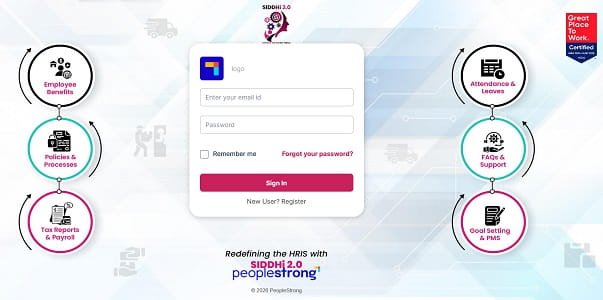
How to Login to SIDDHi Employee Portal
Employees with valid login credentials can access the portal easily.
Step 1: Visit the Official Portal
Open your browser and visit: https://siddhi2careers.peoplestrong.com/login
Step 2: Enter Official Email ID
Type your registered company email address.
Step 3: Enter Password
Now enter your secure password carefully.
Step 4: Click Sign In
Click the “Sign In” button to access the employee dashboard.
Employees may also use the “Remember Me” option while accessing the portal on personal devices.
Main Features of SIDDHi 2.0 Portal
The platform provides several HR and employee management services.
Attendance and Leave Management
Employees can monitor:
- Daily attendance
- Punch-in and punch-out records
- Leave balances
- Leave approval status
The portal supports digital leave applications for different leave categories.
Payroll and Salary Services
Employees can access salary-related information online.
Payslip Download
Monthly salary slips can be downloaded directly from the portal.
Tax Reports
The system also provides access to:
- Annual tax documents
- Payroll summaries
- Salary reports
This helps employees manage tax filing more easily.
Employee Benefits Information
Employees can check details related to:
- Insurance coverage
- Company benefits
- Employee welfare programs
- Corporate policies
Policies and SOP Access
The portal helps employees stay updated with:
- Company guidelines
- Standard operating procedures
- HR policies
- Internal notifications
Performance Management System (PMS)
Employees can participate in performance-related activities through the portal.
Goal Setting
Staff members can set and monitor professional goals.
Performance Evaluation
Managers and employees can access evaluation and review systems digitally.
HR Support and FAQs
The platform also includes:
- Employee FAQs
- HR support resources
- Helpdesk information
- Internal support services
This helps employees resolve common issues quickly.
Forgot Password Process
Employees who forget their password can recover access online.
Steps to Reset Password
- Click on “Forgot your password?”
- Enter registered email or employee details.
- Verify through OTP or email link.
- Create a new password.
New User Registration
New employees joining Ecom Express can activate their account through the registration option.
Registration Process
- Click on “New User? Register.”
- Enter required employee information.
- Complete account verification.
- Set login password.
Common Login Problems and Solutions
Incorrect Password
Double-check email ID and password carefully before login.
Browser Issues
Use updated browsers like:
- Google Chrome
- Microsoft Edge
for better performance.
Portal Not Loading
Clear browser cache and cookies if pages fail to load properly.
Email Verification Problems
Ensure the registered company email is entered correctly.
Security Tips for Employees
Keep Password Confidential
Do not share login credentials with others.
Logout After Use
Always logout after accessing the portal, especially on shared systems.
Use Official Portal Only
Access the system only through the official PeopleStrong login domain.
Avoid Public Networks
Do not access employee accounts through unsecured public Wi-Fi.
Benefits of SIDDHi 2.0 Portal
Faster HR Services
Employees can manage many HR activities online without paperwork.
Better Payroll Transparency
Salary and tax records are directly accessible to employees.
Improved Communication
The platform helps distribute company updates and policies efficiently.
Centralized Employee Management
All major employee services are available in one portal.
Important Information
| Feature | Details |
| Platform | SIDDHi 2.0 |
| Company | Ecom Express |
| HRMS Provider | PeopleStrong |
| Official Portal | siddhi2careers.peoplestrong.com |
| Login ID | Official Email ID |
| Main Services | Attendance, Payroll, Leave, PMS |
Final Words
The SIDDHi Ecom Express Employee Login portal has become an important HR management platform for employees working across Ecom Express operations. From attendance tracking and payroll management to performance evaluations and policy access, the system simplifies many daily HR activities.
By using a cloud-based HRMS platform like PeopleStrong, Ecom Express improves employee convenience, administrative efficiency, and digital workforce management across the organization.