 By Saksham Arora
 Sharda University uses a dedicated employee portal to manage HR services, attendance, payroll, and administrative tasks for faculty and staff members. The platform, commonly known as the eSharda Employee Portal, helps employees access important work-related information online from anywhere.
The portal is based on a PeopleSoft-powered HR management system and is widely used by teaching staff, administrative employees, and university departments for daily operations.
From downloading payslips to applying for leave and checking attendance records, the Sharda Employee Login portal simplifies many internal processes digitally.
What is Sharda Employee Login Portal?
The Sharda Employee Portal is an online Human Resource Management (HRM) platform developed for university employees.
Through this portal, staff members can:
- View attendance records
- Apply for leave
- Download salary slips
- Update personal information
- Access payroll details
- Check university notifications
The system reduces paperwork and improves administrative efficiency within the university.
Official Sharda Employee Portal
Employees can access the official HR portal through: employee.esharda.net
The platform should always be accessed using a secure internet connection and official credentials.
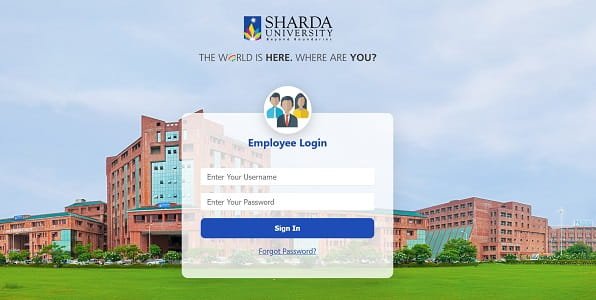
How to Login to Sharda Employee Portal
The login process is simple for employees with valid university credentials.
Step 1: Visit the Official Portal
Open your browser and visit: employee.esharda.net
Step 2: Enter Username
Type your assigned Employee ID or username provided by the university.
Step 3: Enter Password
Now enter your secure password carefully.
Step 4: Click Sign In
Click the “Sign In” button to access your employee dashboard.
After successful login, employees can access various HR and payroll services.
Main Features of Sharda Employee Portal
The portal offers several useful features for university staff.
Attendance Management
Employees can check:
- Daily attendance
- Punch-in and punch-out records
- Monthly attendance summaries
This helps staff track working hours and attendance history easily.
Leave Management System
Faculty and staff members can apply for different types of leave online including:
- Casual Leave
- Sick Leave
- Earned Leave
Employees can also monitor leave approval status directly through the portal.
Payroll and Salary Services
The portal provides access to important salary-related information.
Payslip Download
Employees can download monthly salary slips anytime.
Tax and Form-16 Access
Users can view:
- Tax deduction details
- Annual salary statements
- Form-16 for income tax filing
Personal Information Management
Employees can update certain profile details including:
- Contact information
- Emergency contact details
- Address information
- Professional details
University Notifications
The portal also displays official notices, circulars, and administrative announcements for employees.
Difference Between Employee Portal and Academic Portal
Sharda University uses different systems for HR and academic management.
Employee Portal
The employee portal mainly handles:
- HR services
- Attendance
- Payroll
- Leave management
Portal:
employee.esharda.net
Academic Portal
The academic portal is designed for:
- Student attendance
- Teaching schedules
- OBE modules
- Question banks
- Academic management
Portal:
academicportal.sharda.ac.in
Faculty members may need OTP verification for academic portal access.
Forgot Password Process
Employees who forget their password can recover access through the portal.
Steps to Reset Password
- Click on “Forgot Password?”
- Enter your Employee ID or username.
- Follow the verification process through registered email.
- Create a new password.
Common Login Problems and Solutions
Incorrect Credentials
Ensure there are no typing mistakes or extra spaces while entering login details.
Browser Issues
Clear browser cache and cookies if the page is not loading correctly.
OTP Not Received
For academic portal OTP issues, check your official university email account.
Slow Portal Loading
Use updated browsers like:
- Google Chrome
- Mozilla Firefox
for smoother access.
Technical Support for Employees
Employees facing technical issues can contact the university IT support team.
HR & Technical Support Email
sap.support@sharda.ac.in
LMS Support Email
support.lms@sharda.ac.in
Security Tips for Employees
Keep Password Confidential
Never share portal passwords with others.
Logout After Use
Always logout after using the portal, especially on shared devices.
Avoid Public Wi-Fi
Use secure internet connections while accessing employee systems.
Benefits of Sharda Employee Portal
Faster HR Processes
Most administrative tasks can be completed online.
Easy Access to Salary Records
Employees can download salary documents anytime without visiting departments.
Improved Transparency
Staff members can independently verify attendance and payroll information.
Reduced Paperwork
Digital systems reduce dependency on physical forms and manual approvals.
Important Information for Employees
| Feature | Details |
| Organization | Sharda University |
| Main HR Portal | employee.esharda.net |
| Academic Portal | academicportal.sharda.ac.in |
| Login ID | Employee ID |
| Main Services | Attendance, Payroll, Leave |
| Support Email | sap.support@sharda.ac.in |
Final Words
The Sharda Employee Login portal has become an important digital platform for faculty and staff management at Sharda University. With services like attendance tracking, payroll management, leave applications, and online notifications, the portal simplifies everyday administrative work for employees.
As universities continue moving toward digital management systems, platforms like eSharda help create a more organized, transparent, and efficient working environment.