 By Saksham Arora
 The Central Industrial Security Force plays a major role in protecting important national assets such as airports, metro systems, ports, government buildings, and nuclear facilities. With more than 1.5 lakh personnel serving across India, managing employee records and administrative work manually became difficult over time.
To solve this problem, the department introduced the CISF Employee Corner, also known as the e-Sangrahan portal. This digital platform allows CISF personnel to access salary details, leave records, service information, and official tools online from anywhere.
Today, the portal has become an important part of daily administrative work inside the force.
What is CISF Employee Corner?
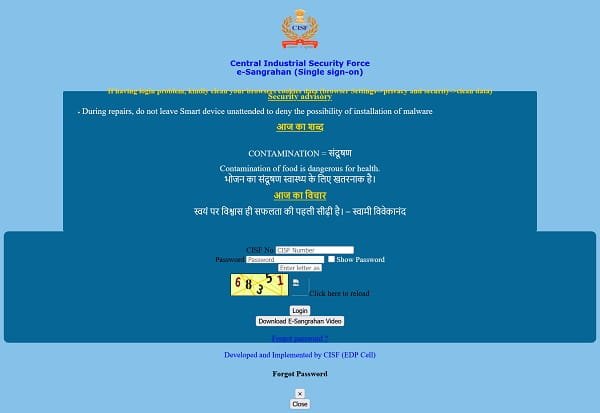
The CISF Employee Corner is an online employee management system created for serving CISF personnel. The portal works as a Single Sign-On (SSO) platform, meaning employees can access multiple internal services using one login ID and password.
The system helps reduce paperwork and saves time for both employees and administrative officers. Instead of visiting office departments repeatedly, personnel can now check important records directly through the portal.
The Employee Corner is mainly accessed through: https://cisfapp.in/e_sangrahan/ERP_NEW/login.php
The portal integrates several important internal applications such as e-Vetan, e-Karyalaya, and service management systems.
Main Features of CISF Employee Corner
The portal offers many useful services for CISF personnel. Some of the major features include:
Monthly Payslip Download
Employees can view and download their salary slips online. The payslip contains complete details including:
- Basic salary
- Dearness Allowance (DA)
- HRA
- Travel allowance
- Deductions
- Net salary
This removes the need for physical salary documents.
Service Record Access
Personnel can check their Personal Information System (PIS) details anytime. This includes posting history, promotions, transfer records, and service-related information.
Leave Management System
The portal allows employees to apply for leave digitally. Users can also track approval status without visiting administrative offices.
Grievance Redressal
Employees can submit complaints or service-related concerns through the portal. This creates a more transparent communication process within the organization.
Single Sign-On Facility
One login gives access to multiple CISF internal systems. This makes the process simpler and faster.
How to Login to CISF Employee Corner
The login process is simple if you have official CISF credentials.
Step 1: Visit the Official Website
Open your browser and visit: Official CISF Employee Corner Login Page
Step 2: Enter CISF Number
Type your CISF Number in the User ID field. This works as your login identification.
Step 3: Enter Password
Now enter your password carefully. First-time users may receive a default password from their unit administration.
Step 4: Complete Captcha Verification
Enter the captcha code shown on the screen correctly.
Step 5: Click Login
After successful verification, you will reach the employee dashboard where all available services can be accessed.
Forgot Password Process
Sometimes employees may forget their login password. The portal provides a recovery option.
Follow these steps:
- Click on the “Forgot Password” option on the login page.
- Enter your Employee ID or CISF Number.
- Complete captcha verification.
- Receive OTP on your registered mobile number or email.
- Create a new password.
If OTP is not received, employees should contact their Unit Operator or administrative office for assistance.
Common Login Problems and Solutions
Many login issues can be solved easily without technical support.
Incorrect Password
Double-check uppercase and lowercase letters while typing the password.
Browser Cache Problem
Old browser cookies sometimes create login errors. Clear browser cache and cookies from settings before trying again.
Slow Website Loading
Heavy traffic during salary release dates can slow the portal temporarily. Wait for some time and try again.
OTP Not Received
Ensure your mobile number is updated in the e-Vetan system.
Security Tips for Employees
Since the portal contains sensitive service and salary information, CISF advises employees to follow proper security measures.
Never Share Passwords
Do not share login details with colleagues or unknown persons.
Avoid Untrusted Applications
Avoid downloading unofficial apps on devices used for official work.
Logout After Use
Always logout after completing work, especially on shared computers.
Scan Downloaded Files
Any downloaded document should be scanned before opening on personal devices.
Importance of Digital Transformation in CISF
The launch of the Employee Corner has greatly improved administrative efficiency within the force. Earlier, personnel posted in remote areas often faced delays in accessing salary records, leave approvals, or service information.
Now most of these services are available instantly online.
This digital system has improved transparency and reduced paperwork. Employees can monitor their salary details, GPF contributions, and official records without depending completely on office staff.
It has also strengthened communication between personnel and higher authorities.
Important CISF Online Services
Here are some useful CISF online platforms linked with the Employee Corner:
| Service | Purpose |
| e-Vetan | Salary and allowance details |
| e-Karyalaya | Official office management |
| Recruitment Portal | Admit cards and recruitment updates |
| M-Power App | Mobile access for employees |
Recruitment Portal: https://cisfrectt.cisf.gov.in/
Final Words
The CISF Employee Corner has become an essential digital platform for serving personnel of the force. From salary slips to leave management and grievance support, the portal simplifies many important administrative tasks.
As the CISF continues modernizing its systems, platforms like e-Sangrahan are helping improve transparency, speed, and convenience for employees working across different parts of India.