 By Saksham Arora
 The Government of West Bengal manages employee salary, treasury, pension, and financial administration through the Integrated Financial Management System (IFMS). The platform, commonly known as WBIFMS, helps state government employees access important financial and service-related information online.
One of the most important sections of this system is the e-Services for Employees (eSE) portal. Through this online service, employees can manage salary records, GPF details, leave applications, and tax-related documents digitally.
The WBIFMS employee portal has significantly reduced paperwork and improved transparency for government employees across West Bengal.
What is WBIFMS Employee Portal?
WBIFMS is an online financial management system developed for West Bengal government departments and employees.
The e-Services for Employees (eSE) section allows staff members to:
- Download salary slips
- Access GPF statements
- Apply for leave
- Submit income tax declarations
- Update family details
- Track payment status
The system simplifies financial and HR-related processes through digital access.
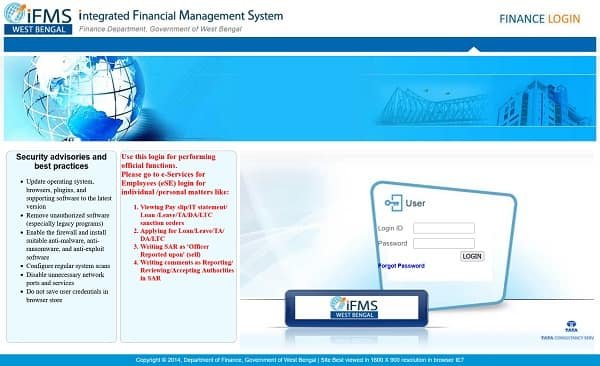
Official WBIFMS Portal
Employees can access the official portal through: https://www.wbifms.gov.in
The portal includes various modules for employees, pensioners, departments, and treasury operations.
How to Login to WBIFMS Employee Portal
The login process is simple for employees with valid HRMS credentials.
Step 1: Visit the Official Website
Open your browser and visit: https://www.wbifms.gov.in
Step 2: Open e-Services for Employees
Find and click on the “e-Services for Employees (eSE)” option available on the homepage.
Step 3: Enter HRMS ID
Type your HRMS ID or Employee Code carefully.
Step 4: Enter Password
Now enter your login password.
Step 5: Complete OTP Verification
The system may send an OTP to your registered mobile number for additional security.
Step 6: Enter Captcha and Login
Complete captcha verification and click the login button.
After successful verification, the employee dashboard will open.
Main Features of WBIFMS eSE Portal
The portal provides several useful financial and HR services for employees.
Online Payslip Download
Employees can download monthly salary slips directly from the portal.
Payslips usually contain:
- Basic Pay
- Dearness Allowance
- HRA
- Salary Deductions
- Net Salary
- Income Tax Details
Annual salary statements are also available.
Income Tax Declaration
Employees can submit tax-saving declarations online including:
- LIC premiums
- PPF investments
- Housing loan details
- Other eligible deductions
The portal also provides Form-16 download facilities.
GPF Statement Access
Employees can check General Provident Fund (GPF) records including:
- Monthly contributions
- Current balance
- Loan status
- Interest details
This helps employees monitor retirement savings easily.
Leave Management System
The eSE portal allows employees to:
- Apply for leave online
- Check leave balances
- Track approval status
Different leave categories such as Casual Leave, Earned Leave, and Medical Leave can be managed digitally.
Family and Nominee Information
Employees can update and maintain:
- Family records
- Nominee information
- Insurance details
- Pension-related data
This helps ensure proper employee record management.
WBIFMS Mobile App
WBIFMS is available for mobile users who want quick access to employee services.
The app allows users to:
- Check payment status
- Download payslips
- View official circulars
- Access employee services on smartphones
The mobile platform is useful for employees working in field departments or remote locations.
Forgot Password Process
Employees who forget their login password can reset it online.
Steps to Reset Password
- Click on “Forgot Password.”
- Enter HRMS ID.
- Verify mobile number through OTP.
- Create a new password.
If the registered mobile number has changed, employees may need departmental assistance.
Common Login Problems and Solutions
Incorrect Password
Check password spelling carefully and avoid extra spaces.
OTP Not Received
Wait for a few minutes and ensure proper mobile network coverage.
Slow Portal Loading
Heavy traffic during salary processing dates may temporarily slow the website.
Browser Cache Problems
Clear browser cache and cookies if pages fail to load correctly.
Technical Support for Employees
Employees facing technical issues can contact official support.
Help Desk Numbers
- +91 9038003413
- +91 9038003414
- +91 9038003415
- +91 9038003416
- +91 9038003417
Benefits of WBIFMS Portal
Reduced Paperwork
Most employee financial services are now available online.
Better Transparency
Employees can directly monitor salary and GPF details.
Faster Administrative Work
Online systems reduce delays in processing and approvals.
Easy Access to Records
Employees can access important financial information anytime.
Important Information for Employees
| Feature | Details |
| Portal Name | WBIFMS |
| Official Website | wbifms.gov.in |
| Login ID | HRMS ID |
| Main Service | e-Services for Employees (eSE) |
| Mobile Access | WBIFMS App |
| Help Desk | 9038003413 |
Final Words
The WBIFMS Employee Login portal has become an important digital service platform for West Bengal government employees. From salary slips and GPF records to leave management and tax declarations, the eSE portal simplifies many important administrative tasks.
As government services continue moving online, systems like WBIFMS are helping improve transparency, efficiency, and employee convenience across West Bengal.